
Let's be honest about something.
Most organisations that buy Microsoft 365 Copilot licences are not getting the value they expected. The licences are assigned. The announcement email went out. And then… nothing much happened.

This is not a Copilot problem. Copilot works. The problem is almost always what happened — or didn't happen — before anyone pressed enable.
Here are the five things that separate a Copilot deployment that delivers from one that quietly becomes expensive shelfware.
1. Audit What Copilot Can Actually See
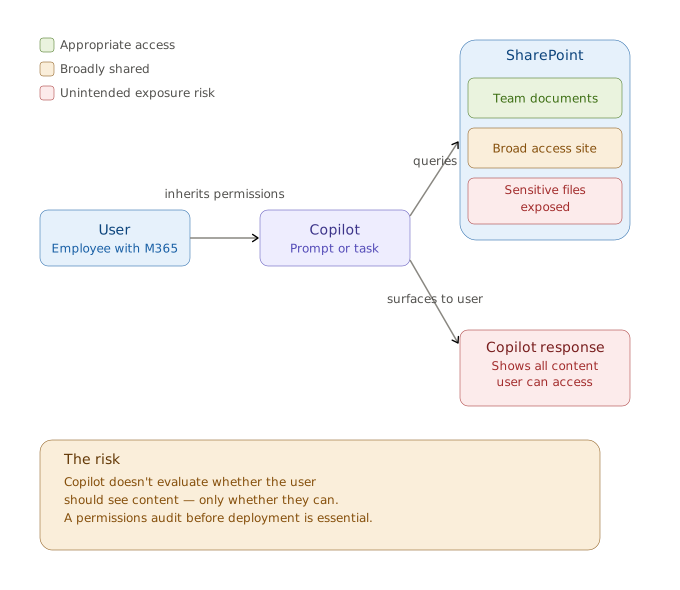
Here's something that surprises a lot of people: Copilot doesn't have its own permissions. It uses the permissions of whoever is running it.
That means every SharePoint site shared with "Everyone except external users," every document library without a sensitivity label, every folder that someone opened up for a project in 2021 and never locked back down — Copilot can see all of it. And it will surface it.
This is not a hypothetical problem. It's one of the most common issues in Copilot deployments.
Before you enable Copilot for anyone, your organisation needs a permissions audit. Not a quick glance. A proper audit that answers: who can see what, and should they?
If you skip this step, Copilot will do exactly what it's designed to do — surface information efficiently. It just might surface it to the wrong people.
2. Sort Out Your Data Before You Amplify It
Think of Copilot as an amplifier. It takes what's in your Microsoft 365 environment and makes it faster to find, easier to use, and more accessible.
If your data is well-organised and current, that amplification is genuinely powerful.
If your SharePoint looks like a digital filing cabinet that hasn't been touched since 2018 — inconsistent folder structures, outdated documents, no metadata, no content types — Copilot will amplify that too.
Garbage in. Garbage out. Except now it happens at AI speed.
The data hygiene work — archiving what's obsolete, applying sensitivity labels, enforcing consistent content types — is unglamorous. It's also the single thing that most determines whether your Copilot deployment succeeds.
3. Start With One Team, Not The Whole Organisation
Enabling Copilot for 500 people on day one is the fastest way to ensure that 500 people try it once, get inconsistent results, and decide it's not worth the effort.
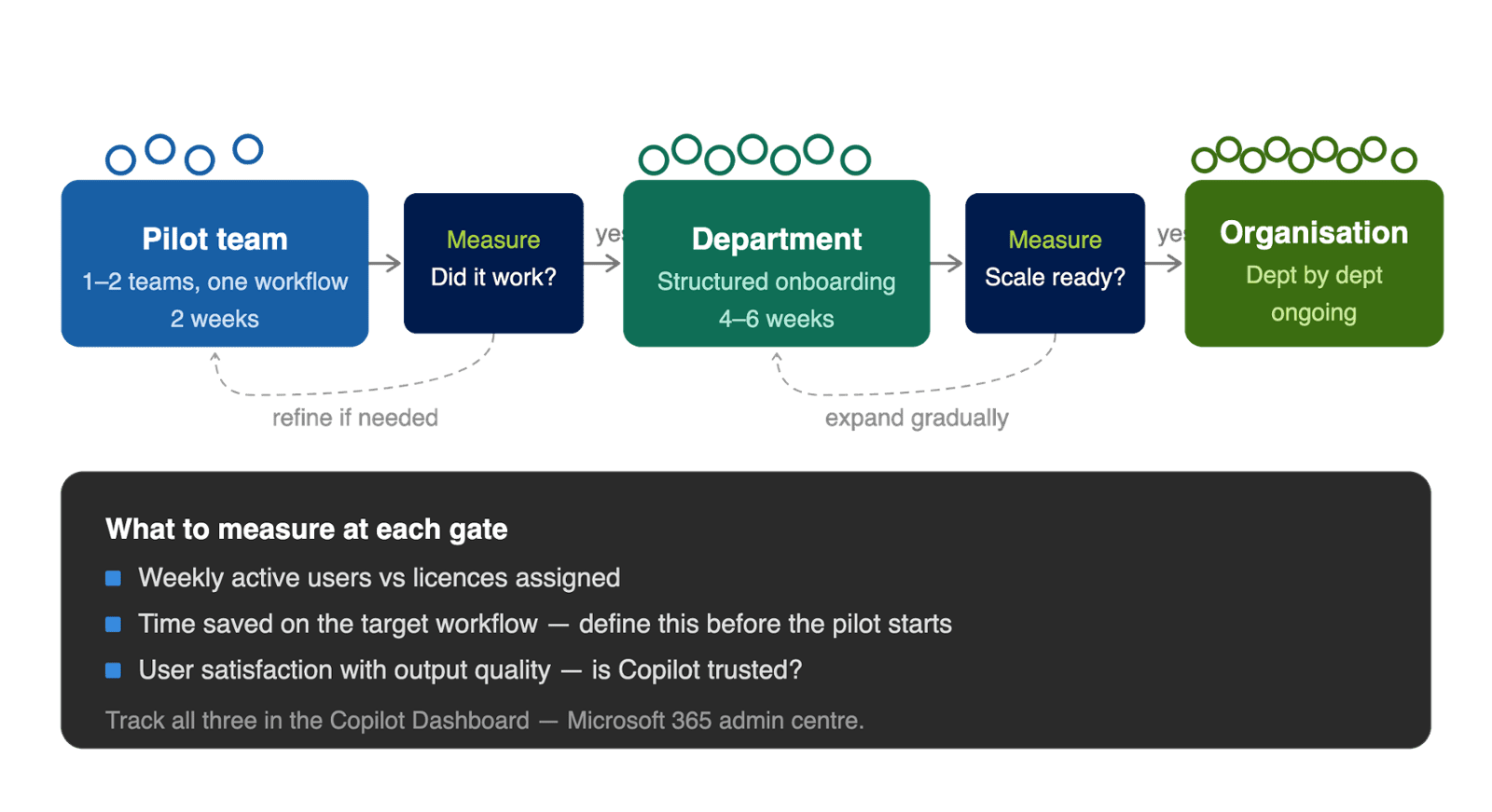
The organisations that see strong Copilot adoption do it differently. They pick one team with a specific, measurable workflow. A finance team that produces a weekly report. A procurement team that reviews the same document types every month. An HR team with a predictable onboarding process.
Deploy to that team. Train them on that specific workflow. Measure whether it saves time. Document what worked. Then use that as the blueprint for everyone else.
A well-run pilot is the difference between a Copilot deployment that builds momentum and one that never gets past the announcement.
4. Decide What Success Looks Like Before You Start
This sounds obvious. Most organisations skip it.
If you don't define what success looks like before a Copilot deployment, you can't tell whether it's working three months in. You can't identify problems early. You can't justify the investment to leadership when they ask.
Your success metrics don't need to be complicated. Weekly active usage versus licences assigned. Time saved on a specific recurring task. User satisfaction score from the pilot team. The Microsoft 365 admin centre has a Copilot Dashboard that gives you adoption data across every application. Use it from day one, not after things start going wrong.
5. Change Management Is Not Optional. It's the Whole Point.
Sending a "Copilot is now available" email is not a rollout. It's an announcement. Those are different things.
People adopt new tools when they understand why those tools matter for their specific work. When they can see colleagues using them. When they have someone to ask when they get stuck.
This means identifying champions in each team — people who are curious about the technology and willing to share what they discover. It means building Copilot use cases into the workflows people already follow, rather than treating Copilot as something extra to remember. And it means maintaining that effort for weeks and months, not just at launch.
The technology adoption gap is a behaviour change problem. It responds to behaviour change solutions.
What Happens When You Skip These Steps
The pattern is consistent enough that it has a name in the industry: "shelfware." Licences that are paid for, assigned, and barely used.
It usually unfolds the same way: licences purchased, announcement made, training session held, adoption flatlines, leadership asks why ROI is low, nobody has a good answer because nobody measured anything, the investment is hard to justify at the next renewal.
None of that is inevitable. It's the result of skipping the preparation that sits between procurement and deployment.
The good news: all of it is fixable. Even if you've already deployed.
If your Copilot adoption is lower than you'd hoped, start with the Copilot Dashboard in the admin centre. It will show you exactly where usage is and where it's not. That data tells you which of the five steps above to address first.
Ready to get your Copilot deployment right?
GTconsult works with organisations across South Africa, the UK, and the US on Microsoft 365 planning, deployment, governance, and adoption. Get in touch for a free consultation.