
Let's be honest — most people don't think about their SharePoint server the same way they think about their laptop or their phone. Those things feel personal. When they slow down or get old, you notice. SharePoint though? It quietly sits in the background, doing its job, and nobody gives it much thought.
Until one day, it becomes a very expensive problem.
That day is getting closer. On July 14, 2026, Microsoft officially ends support for SharePoint Server 2016 and SharePoint Server 2019. Both versions. At the same time. No extensions. No emergency patches. No safety net.
If your organisation is still running either of those versions, and there are a lot of organisations that are, this is the conversation you need to be having right now.
What Does "End of Support" Actually Mean?
It's a fair question because the phrasing can feel a bit abstract. Here's what it means in plain language:
After July 14, 2026, Microsoft will no longer release security updates for SharePoint Server 2016 or 2019. They won't fix bugs. They won't patch vulnerabilities. If a cyber threat specifically targets your version of SharePoint, Microsoft will not respond. You're on your own.
Your server won't suddenly shut down. Everything will look exactly the same the morning of July 15. Files will still open. Sites will still load. But underneath that familiar interface, you'll be running a platform that no longer has anyone watching its back.
The April Deadline Most People Are Missing
Here's what makes this even more urgent: July isn't the only deadline you need to worry about.
On April 2, 2026, Microsoft is retiring the SharePoint Add-In model and classic SharePoint 2013 workflows- permanently. If your environment relies on workflows built in SharePoint Designer, approval processes tied to the Add-In framework, or third-party add-ins using Azure ACS authentication, those things will stop working before July even arrives.
April 2, 2026. That's less than a year away as you're reading this.
This affects more organisations than you'd think. A lot of business-critical processes, finance approvals, HR routing, records management, procurement sign-offs, were built on classic SharePoint workflows. When these retire, they don't just slow down. They break.
The Full Timeline at a Glance
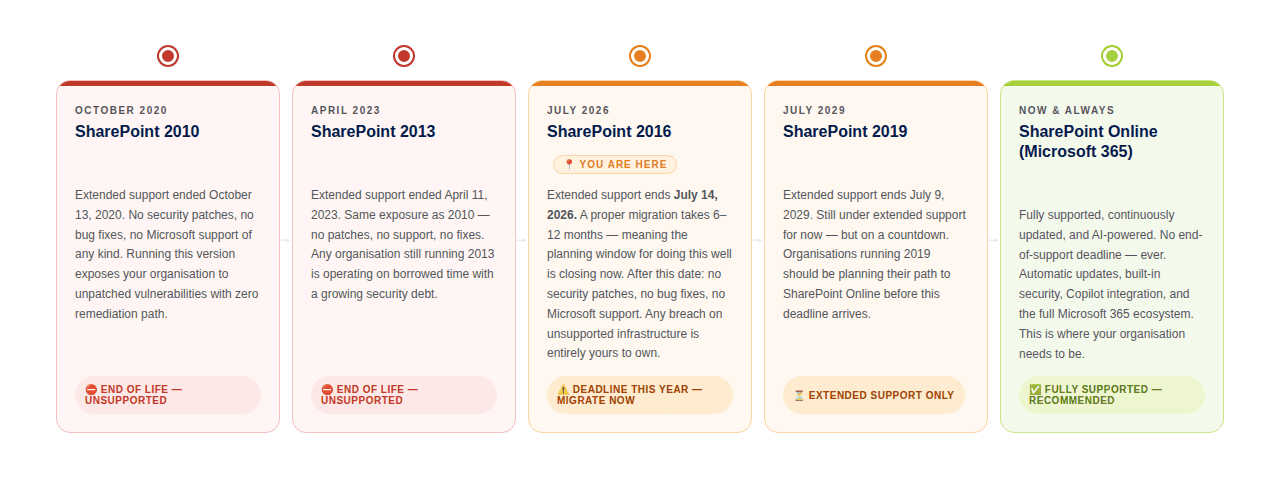
Who Should Be Concerned About This?
- Your organisation runs SharePoint Server 2016 or 2019 as your intranet or document management platform
- You have workflows built on SharePoint Designer or classic SharePoint approval processes
- Your business uses custom Add-Ins or third-party integrations built on the Add-In framework
- You handle regulated or sensitive data that requires you to run supported, patched software
- Your IT team manages the SharePoint environment with limited capacity to respond to incidents without vendor support
What Are Your Options?
- SharePoint Online (Microsoft 365): The cloud-first path. Continuous updates, automatic security patches, Copilot AI integration, and the ability for your team to collaborate from anywhere. Microsoft's preferred destination.
- SharePoint Server Subscription Edition (SE): The on-premises path for organisations with compliance requirements or data sovereignty constraints. Released in 2021, it runs on Microsoft's Modern Lifecycle — no fixed end-of-life date.
- Hybrid approach: Combining on-premises SharePoint SE with SharePoint Online for organisations that need a phased transition or have specific data that must remain local.
The right path depends on your environment, your data, your compliance requirements, and your team's capacity. What's universal is this: migrations of meaningful size take anywhere from three months to well over a year, depending on complexity. If you haven't started planning, the window is narrowing.
The Question Worth Asking Right Now
If your SharePoint environment went down tomorrow, not a migration, just an unplanned outage after July 2026, how long could your business operate? Who would you call? What would your IT team do without a Microsoft support ticket to open?
That's the risk you're accepting by waiting.
At GTconsult, we've spent 15 years helping organisations navigate SharePoint migrations. We know what a well-planned migration looks like, and we know what a rushed one costs. The difference is almost always time — specifically, how much of it you have left when you start.
Want to estimate the cost of your migration?
Use our free Migration Cost Calculator to get an estimate based on your environment size. It takes a few minutes and gives you a starting point for your planning conversations.